
Map and Set in JavaScript
Understanding Maps and Arrays in JavaScript: Storing and Managing Data Efficiently

JavaScript originally gave us Objects and Arrays for most data handling. But as applications scaled, their limitations became obvious. That’s where Map and Set come in.
Problems with Traditional Objects and Arrays
Objects — Hidden Complexity
Keys are always strings or symbols
No guaranteed order.
Prototype pollution issues (
__proto__, inherited keys)Poor performance for frequent insert/delete in some cases
Example:
const obj = {};
obj[1] = "one";
obj["1"] = "string one";

console.log(obj);
// { '1': 'string one' }  <-- collision!
Arrays — Not for Uniqueness
Allow duplicates
Removing items is expensive
const arr = [1, 2, 2, 3];
If you want uniqueness → you manually handle it → bad design.
What Map is ?
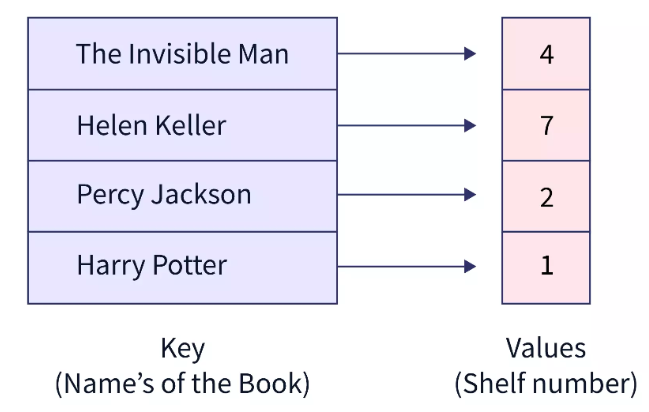
A map is used for storing data in form of key value pair where keys are used to uniquely identify elements. Values are the data related to it.
Keys can be of any data type (string, object, numbers etc.).
It maintains the insertion order which means it iterates in the form in which the data is inserted.
How to Create a Map
You create a JavaScript Map by:
Create a new Map and add elements with
Map.set()Passing an existing Array to the
new Map()constructor
const map = new Map();
map.set(1, "number key");
map.set("1", "string key");

console.log(map.get(1));   // number key
console.log(map.get("1")); // string key
What is set ?
A set is a collection of unique value. In set a value can be iterated only once. It maintains the insertion order. Value type: Primitive or Object.
Creates a new set
Parse a array into new set().
Create an empty set and add() to insert values.
const letters = new set();
letters.add("a")
letters.add("b")
letters.add("c")
letters.add("b")

console.log(letters.size) // Output: 3 (will not read duplicate)

console.log(letters.has(a)) // Output: True

for (letter of letters){
console.log(fruits);
}

// Output:
a
b
c
// b is duplicate so it will only iterated once.
Difference between Map and Object
| Feature | Map |
Object |
|---|---|---|
| Key Types | Can be any data type (including objects, functions, or primitives). | Keys must be a String or Symbol; other types are converted to strings. |
| Key Order | Preserves the original insertion order of keys. | Key order is not guaranteed in the same way as a Map, although modern JS engines have defined rules for own properties. |
| Size | Easily retrieved with the built-in .size property. |
Requires Object.keys(obj).length, which is more roundabout and potentially less efficient. |
| Iteration | Directly iterable using for...of loops |
Not directly iterable by default; requires functions like Object.keys(), Object.values(), or Object.entries() to get an iterable. |
Difference between Set and Array
| Feature | Set |
Array |
|---|---|---|
| Duplicates | Not allowed; automatically enforces uniqueness. | Allowed; can contain multiple identical values. |
| Ordering | Elements are iterated in insertion order. | Elements are stored and accessed by their numerical index (0-based). |
| Accessing Elements | No direct index-based access. Elements are accessed via iteration or the has() method for membership checking. |
Elements are accessed directly using their index (e.g., arr[1]). |
| Checking Existence | Uses the has() method, for large datasets due to internal hash table use. |
Uses methods like includes() or indexOf(), which can be slower (O(n) time complexity) as they iterate through elements sequentially. |
When to Use Map and Set
Use Map when:
Keys are not strings
You need reliable insertion order
Frequent add/remove operations
You’re building lookup tables
const userRoles = new Map();
userRoles.set(userObject, "admin");
Use Set when:
You need uniqueness
Fast membership checks
Removing duplicates
const visitedPages = new Set();
visitedPages.add("/home");
Final Insight
End with a strong conceptual takeaway:
Objects and Arrays are general-purpose tools.
Map and Set are intent-driven data structures.
That’s the real difference:
Object → flexible but messy
Map → precise key-value storage
Array → ordered list
Set → uniqueness-focused collection


