
Error Handling in JavaScript: Try, Catch, Finally
A Complete Guide to Catching, Handling, and Recovering from Errors

1. What errors are in JavaScript
Errors are object in javascript that represents problem in code execution, either preventing the program from running or causing it to behave unexpectedly. Remember:
Errors are not just crashes.
Errors are not the same as wrong output.
Errors are explicitly recognized by the engine.
// ReferenceError — variable not defined
console.log(username);  // ReferenceError: username is not defined

// TypeError — calling a non-function
const num = 42;
num.toUpperCase();      // TypeError: num.toUpperCase is not a function

// RangeError — value out of range
const arr = new Array(-1);  // RangeError: Invalid array length

// SyntaxError — malformed JSON
JSON.parse("{ bad json }");  // SyntaxError: Unexpected token b
1.1 Compile Time Error (Syntax Error):
These errors occurs due to the violation in the code, means the violation of grammatical rules of javascript language. Syntax error are detected during the parsing or compile time. Example includes missing paranthesis brackets etc.
if (true {
    console.log("Hello");
};

// This will throw an error.
// Missing ) after true, It will be detected before execution so this will not be executed at all.
1.2 Runtime Error
This runtime error occur during the execution of program even the syntax is correct. The main reason behind this is unexpected condition like undefined variable or calling a method with a null value.
console.log(Username)

// Username is not defined so it will give a runtime error.
2. Using try and catch blocks
A try...catch block is a mechanism to handle errors gracefully. It helps in preventing to crash the entire program or code. It allows you to try a block of code and catch any error occurred within it.
try {
  // Code that might throw an error (exception)
} catch (error) {
  // Code to handle the error
2.1 try Block
This block contains the block of code you want to execute but in this code there is a possibility of any error. So, if any error will occur the try block execution will stop and procced to the catch block.
2.2 catch Block
This catch block contain the statement that tells what to do in the case of exception in try block. In catch block an argument is passed and commonly named as error or err it contain the details about what happened in that error like error.message or error.name .
try {
    // Code that might cause problem
    console.log("Start of try block");
    console.log(num); // The variable 'num' is not defined, this will throw a ReferenceError

     console.log("End of the try block (this line is skipped if an error occurs)");

} catch (error) {
    // code to handle error
    console.error("An error Occurred"); // The 'error' object contains details like name and message

    console.error("Error name", error.name);
    console.error("Error message:", error.message);
}

console.log("Script finished (execution continues after handling the error)");
Output:
Start of the try block
An error occurred!
Error name: ReferenceError
Error message: num is not defined
Script finished (execution continues after handling the error)
3. The finally block
This finally block contains the code that guarantees the execution. It will always be executed if the try block get error and forward it to the catch block even if this catch re threw the error. It is useful for the cleanup task like closing files etc.
Example With an Error
function errorExample() {
    try {
    console.log("Start of the try block");
    // An error will be thrown here because the variable is undefined
    undefinedVariable;

     console.log("End of the try block (this line is never reached)");

    } catch (error) {
        console.log("An error was caught!");
         console.error("Error details:", error.message); // Log the error message

    } finally {
        console.log("This is the finally block, it always runs.");
    }
}
errorExample();
Output:
Start of the try block
An error was caught!
Error details: undefinedVariable is not defined
This is the finally block, it always runs.
Example Without an Error
function noErrorExample() {
    try {
    console.log("Start of the try block (no error here)");
    } catch (error) {
    console.log("The catch block is skipped because no error occurred.");
    } finally {
    console.log("This is the finally block, it always runs.");
    }
}
noErrorExample();
Output:
Start of the try block (no error here)
This is the finally block, it always runs.
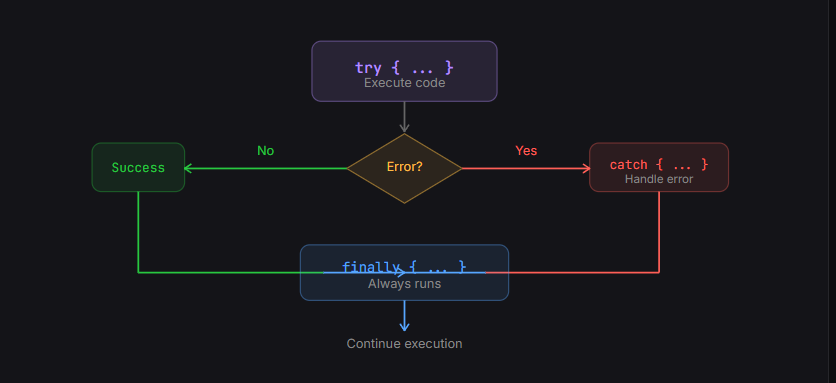
4. Throwing custom errors
In Javascript errors the built-in types covers all the generic failures but in real time application need some specific errors. So, you can use throw statement to create your own custom errors .
function validateAge(age) {
  if (age < 18) {
    throw new Error("Age must be 18 or older to access this feature.");
  }
  console.log("Access granted. Welcome!");
}

try {
  validateAge(15);
} catch (error) {
  console.error("Error name:", error.name);       // Output: Error name: Error
  console.error("Error message:", error.message);   // Output: Error message: Age must be 18 or older to access this feature.
}

console.log("Program continues after handling the error.");
5. Why error handling matters
Error handling matters because things will break, and you need control over what happens when they do.
Without it:
your app crashes
users see nothing useful
you can’t debug properly
With it:
your app fails gracefully
users get clear feedback
you can track and fix issues
6. Conclusion
Wrap risky code in try. Handle errors in catch — be specific, never swallow silently. Clean up in finally. Throw custom errors for meaningful domain-level failures. Error handling is how you show users respect and future-you gratitude.


