
Synchronous vs Asynchronous JavaScript
How JavaScript handles tasks: blocking execution vs non-blocking concurrency

JavaScript is known for its ability to handle both synchronous and asynchronous operations. Understanding how these two things work is important for writing efficient, responsive, and user-friendly applications. In this article, we will see the differences between synchronous and asynchronous JavaScript with clear examples to help you.
1. What synchronous code means
In synchronous programming, operation performed in a specific sequence of one after another task. In this sequence each line of code waits for the completions of the previous task. Each program executed in the linear order and every task completed before next task.
console.log("Hii");
console.log("Piyush");
console.log("How are you?");
Output:
Hii
Piyush
How are you?
2. What asynchronous code means
Asynchronous code allows a program to execute a long running process like (fetching a data from a file) while this task is running other task will also continue even before first one is completed.
Application code helps application from freezing, Here freezing means if a task is executing in a linear order and long running process is initiated then other task will stop or have to wait for long. But async code helps to prevent this freezing.
console.log("Start of script");
    setTimeout(function() {
    console.log("Inside setTimeout callback (runs after 2 seconds)");
}, 2000);
    console.log("End of script");
Output:
Start of script
End of script
Inside setTimeout callback (runs after 2 seconds)
3. Why javascript need asynchronous
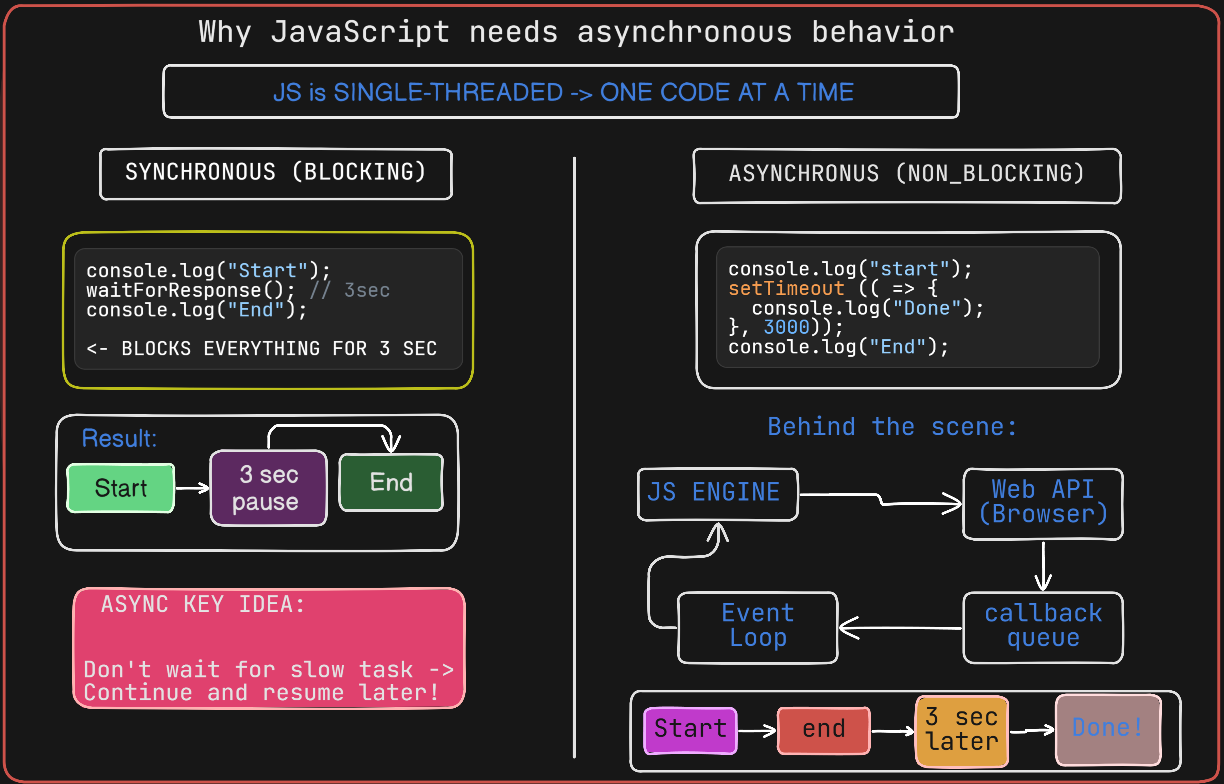
Javascript is a single threaded language so it executes code on a single thread which means at a time it can do only one thing. In this case a time taking operation can freeze the entire process or application.
The Asynchronous Model: Offloading Work
1. JavaScript solves this using:
Web APIs / Node APIs (handled outside JS engine)
Event loop
Callback queue / microtask queue
2. Flow:
JS delegates slow work (e.g., fetch)
Continues executing other code
When work finishes, callback/promise is queued
Event loop pushes it back to the call stack
Case 1: Synchronous (Blocking Mindset) Example
console.log("Start");

function longTask() {
    const start = Date.now();
    while (Date.now() - start < 3000) {} // Blocks for 3 seconds
}

longTask();
console.log("End");

/* Output:
Start
(3 seconds pause)
End
*/
Case 2: Asynchronous (Non-Blocking) Example
console.log("Start");

setTimeout(() => {
    console.log("Async Task Done");
}, 3000);

console.log("End");

/*
Start
End
(3 seconds later) Async Task Done
*/
4. Examples like API calls or timers
4.1 Example: API Call (Real-world async)
console.log("Start");

fetch("https://jsonplaceholder.typicode.com/todos/1")
    .then(response => response.json())
    .then(data => {
        console.log("Data Received:", data);
});

console.log("End");
Start
End
Data received: { ... }

fetch() → sent to Web API
JS does not wait
"End" executes immediately
When response arrives → goes to microtask queue
Then event loop executes callback
4.2 Same API Example using async/await
async function getData () {
    console.log("Start");

    const response = await fetch ("https://jsonplaceholder.typicode.com/todos/1");
    const data = await response.json();

    console.log("Data Received:", data);
}
getData();
console.log("End");
Start
End Data
received: { ... }
Here, await will only pauses inside the async function, not the whole program.
4.3 Example: Timer (setTimeout)
console.log("Start");

    setTimeout(() => {
        console.log("Timer done");
}, 2000);

console.log("End");
Start
End
Timer done // after 2 sec
5. Problems that occur with blocking code
5.1 UI Freeze (Browser Context)
When the call stack is busy, the browser cannot:
Repaint the screen
Handle clicks, typing, scrolling
Run animations
Examples: while (Date.now() - start < 3000) {}
For those 3 seconds: No button works, No input is processed, The tab looks “dead”.
5.2 Event Handling Stops Completely
button.addEventListener("click", () => {
  console.log("Clicked");
});
if blocking code is running:

Click events are queued
But cannot execute
5.3 Poor User Experience (UX Breakdown)
This is not just “slow”—it’s unresponsive:
Users think app crashed
Leads to repeated clicks (duplicate actions)
Increases bounce rate
6. Conclusion
JavaScript needs asynchronous programming because real-world tasks take time, and waiting for them would freeze everything. Since JavaScript runs on a single thread, it can only do one thing at a time. If it handled slow operations like API calls or file reading synchronously, the entire application would become unresponsive.
Asynchronous programming solves this by allowing JavaScript to keep working while waiting. Instead of stopping execution, it offloads slow tasks and continues running other code. Once the task is complete, the result is handled later through callbacks, promises, or async/await.
In simple terms, async doesn’t make things faster—it makes applications responsive, efficient, and usable. Without it, modern web apps, servers, and real-time interactions simply wouldn’t work.


