
Async/Await in JavaScript: Writing Cleaner Asynchronous Code
From Callback Chaos to Linear Flow: Mastering Async/Await in JavaScript

1. Why async/await was introduced ?
The async/await syntax was introduced in ECMAScript 2017 (ES8) to make asynchronous code easier to write, read, and maintain. But it performs the same operation as Promises (which were introduced earlier in ES6).
These are the main reasons of its Introduction:
a. Before async/await developer used callbacks methods. But async/await allows them to write asynchronous code that looks and behave like synchronous code, following the regular top to bottom flow.
b. In promises used to use specific .catch() method. In async/await you can use try..catch block. and this blocks is for both synchronous and asynchronous code.
c. It eliminates the need for repetitive .then() and .catch() calls, reducing the overall amount of code needed for complex timing problems.
d. Deep nested callbacks made code extremely difficult to debug. async/await simplifies these structures into a linear sequence.
async function getUserData() {
    try {
        const response = await fetch("https://api.example.com/user");
        const user = await response.json(;
        console.log("User:", user);

    }catch (error) {
    console.log("Error:", error);
    }
}
2. How async functions work
In Javascript, there is need of asynchronous programming to handle tasks like API calls, timers and file operation without blocking the execution. So in this process Async helps in a way that it allows asynchronous code to be written in a synchronous looking code. Means the code is async but but it will look like synchronous.
2.1 What is an Async Function ?
An async function is a function that always return a promise.
// This function is marked as 'async'
async function fetchPostData() {
  try {
    console.log("Fetching data...");

    // 'await' pauses the code until the fetch promise resolves
    const response = await fetch('https://jsonplaceholder.typicode.com/posts/1');

    // We must also await the conversion to JSON
    const data = await response.json();

    // This line won't run until the data is fully received
    console.log("Success:", data.title);
  } catch (error) {

    // If anything goes wrong (network error, etc.), it lands here
    console.error("Oops, something went wrong:", error);
  }
}

fetchPostData();
3. Await keyword concept
The await keyword in a operator which used to pause the execution of an async function. It will wait until a promise or task completely settles (resolved or reject). It allows asynchronous code to be written and read like synchronous code.
It prevents the blocking of the execution of main thread.
async function fetchData() {
  const response = await fetch('https://example.com');
  const data = await response.json();
  console.log(data); // Runs only after promise resolves
}
4. Error handling with async code
Error handling in async code allows us to manage errors like - network timeout or database error( database always in another continent it may cause issue) - without crashing the application.
1. Try-catch with Async/Await
This is the most modern and simple approach used in Javascript which is wrapping a await call in try-catch block.
async function loadUser() {
  try {
    const response = await fetch('https://jsonplaceholder.typicode.com/users/1');
    const user = await response.json();
    console.log(user.name);
  } catch (err) {
    console.error("Network or JSON error:", err.message);
  }
}

loadUser();
Why these work:
The
tryblock assumes the "happy path" (everything goes right).The
catchblock acts as a safety net for things you can't control, like a server being down or a syntax error in the data.
5. Comparison with promises
In JavaScript, async/await and Promises are both used to handle asynchronous operations, such as API requests or file reading.async/await is essentially "syntactic sugar" built on top of Promises to make the code more readable and easier to maintain.
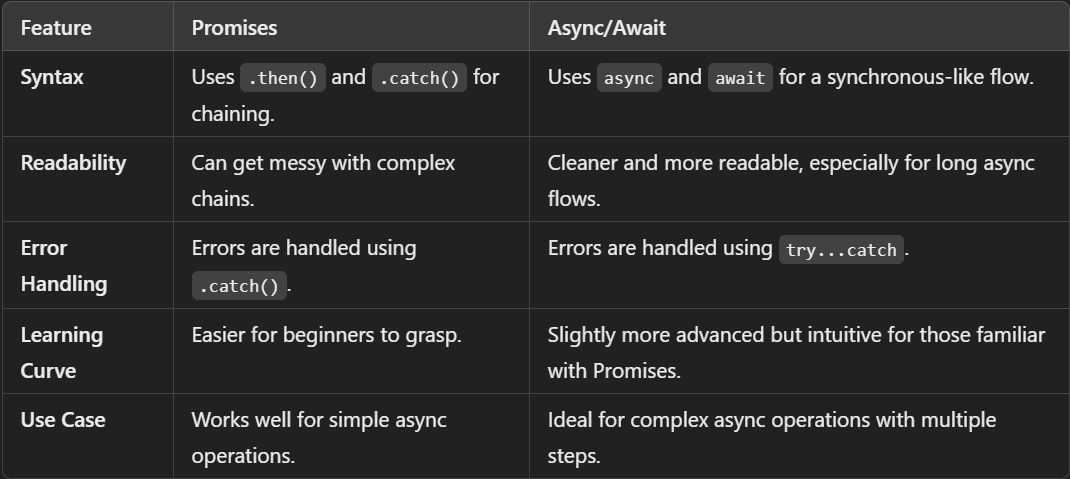
When to Use Each
1. Use Async/Await:
Sequential operations: When task B depends on the result of task A.
Complex conditional logic: If you need to perform different async tasks based on an
if/elsecondition.Cleanliness: For most modern application code to improve developer experience and maintainability.
2. Use Promises:
Parallel execution: When you need to run multiple tasks simultaneously, you use methods like Promise.all() or Promise.allSettled().
Quick results: For simple, one-off operations where a full
asyncfunction would be unnecessary overhead.Library creation: When building utilities that need to be compatible with both styles or offer granular control.
Conclusion:
Async/await (added in ES2017) makes asynchronous JavaScript read and behave more like synchronous code, so it’s easier to write, read, and maintain. Key points:
Replaces deeply nested callbacks and long
.then()chains with a straightforward, top-to-bottom flow.Lets you handle async errors with
try...catch(same style you use for synchronous code) instead of chaining.catch().asyncfunctions always return aPromise;awaitpauses execution inside anasyncfunction until a promise settles, letting you work with the resolved value directly.Overall, it reduces boilerplate and makes debugging and reasoning about async logic much simpler.


